Cart
0

How to Create Print-Ready AI Artwork
A guide for Printofy customers — get your AI-generated designs garment-print-ready, first time.
AI image tools like Chat GPT, Claude, Midjourney, Adobe Firefly, Canva AI, and Ideogram are brilliant for getting a design idea off the ground fast. We love that our customers use them. But most AI-generated artwork — straight out of the generator — is not print-ready.
The result? Our design team ends up spending hours fixing files that could have been right from the start. This guide gives you everything you need to generate clean, professional artwork that goes straight to press — no rework required.
⚠️ Why This Matters for DTF Printing
DTF (Direct to Film) printing transfers ink directly onto film then onto fabric. Unlike paper, the garment is the background — there is no background layer underneath. Any soft edge, drop shadow, outer glow, or semi-transparent pixel will either vanish completely or print as a muddy smudge on the fabric.
1. What Makes a File Print-Ready?
A print-ready artwork file for garment printing must have all of the following:
• Transparent background: No white fill, no coloured fill. Only the artwork itself exists in the file.
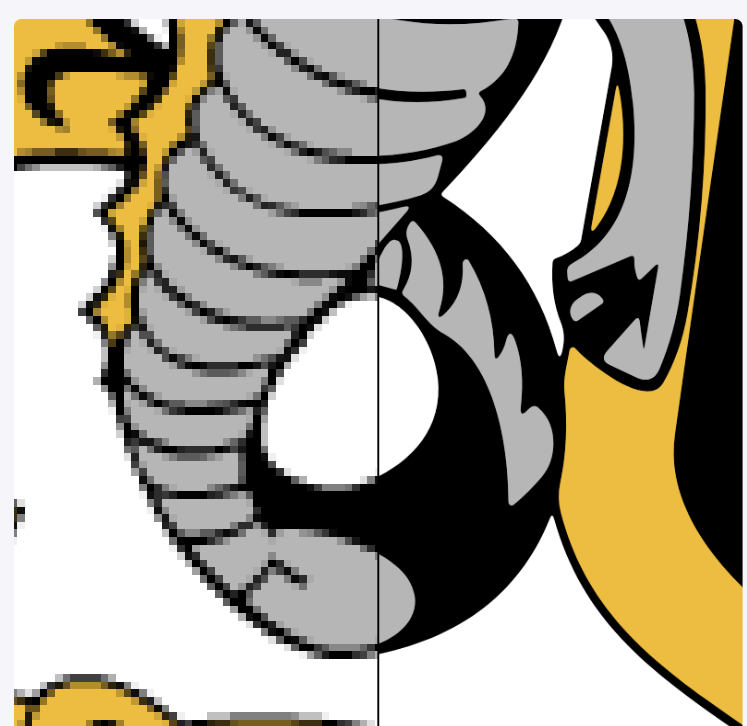
• Hard, clean edges: Every shape boundary is crisp and defined. No feathering, anti-aliasing halos, or soft blending at the edges.
• No outer drop shadows or external glows: Shadows that exist outside your artwork cannot print cleanly. Shadows inside a shape are totally fine.
• Vector-quality artwork: Sharp at any size. Ideally SVG, or a high-resolution PNG at minimum 300 DPI at print size. PDF / AI / PSD / CDR are great too.
• Solid fills and internal gradients only: Gradients within a defined shape are printable. Gradients that fade to nothing outside the shape are not.
• Limited colour palette: Especially for screen-print style designs. Simpler colour use = cleaner results. But we do Full Colour Prints, so no stress on this.
2. Common AI Art Mistakes to Avoid
These AI output styles cause problems at the printing stage:
• Photorealistic or painterly styles — too much texture, too many soft transitions
• Soft or blurred background elements that blend into the design
• Outer drop shadows or glows floating outside the artwork shape
• Gradients that fade to transparent at the edges
• Watercolour, sketch, or pencil textures
• Atmospheric fog, depth-of-field effects, or dramatic lighting
• Hair-thin fine details that disappear at small print sizes
• White or coloured backgrounds baked into the image
These styles work great for DTF garment printing:
• Bold flat illustration styles
• Clean vector or graphic art looks
• Cartoon, badge, or emblem layouts
• Screen-print or sticker-ready designs
• Thick outlines and well-defined shapes
• Limited colour palettes (2–6 colours)
• Solid fills with internal shading or cell-shading
3. The Shadow Rule — Explained Simply
This is the most common source of confusion, so here it is clearly:
❌ NOT printable — Outer / Drop Shadows
A drop shadow that sits outside the shape of your design — floating in open space — cannot print on fabric. This includes: drop shadows, outer glows, cast shadows on a "ground", and any effect that radiates outward into empty space beyond your artwork.
✅ Totally printable — Internal / Inline Shading
Shadows and gradients that exist inside a solid shape print beautifully. This includes: inner shadows within a badge border, colour gradients between solid colours within a defined shape, cell-shading on a character, and highlight effects within lettering. As long as the effect does not extend beyond the hard edge of your design, you are fine.
4. The Golden Rule — Add This to Every Prompt
Whatever your design is, paste this phrase block onto the end of your AI prompt. It eliminates 90% of the problems we see:
“transparent background, no drop shadows, no outer glow, no background elements, hard clean edges, flat vector illustration style, print-ready DTF artwork”
5. Ready-to-Use AI Prompts
Copy and adapt the prompts below in any AI image tool (Midjourney, Adobe Firefly, DALL·E, Canva AI, Ideogram, etc.). Replace the bracketed sections with your own details.
Prompt 1 — Tradie / Trade Business Logo
A bold, clean logo for a [trade type, e.g. electrical / plumbing / construction] business called "[Business Name]". The design features a [icon, e.g. lightning bolt / wrench / hard hat] with thick clean outlines. Flat graphic illustration, no photorealism. Solid colour fills only, internal shading allowed. Transparent background. No drop shadows, no outer glow, no background elements, no gradients fading to transparent. Hard crisp edges throughout. Vector illustration style, sticker-ready, print-ready artwork suitable for garment DTF printing.
Tip: Swap in your trade type, business name, and icon. Keep the rest exactly as written.
Prompt 2 — Badge / Emblem Style
A professional badge emblem logo for "[Business Name]". Classic shield or circular emblem shape with bold typography and a [icon] in the centre. Flat vector illustration, bold solid fills, 3–5 colour palette. No photorealistic effects, no outer drop shadows, no glows, no background fill, no atmospheric effects. Hard defined edges on every element. Transparent background. Print-ready for DTF garment printing, sticker-ready artwork quality.
Tip: Badge and emblem designs sit particularly well on polo shirts and workwear.
Prompt 3 — Mascot / Character Logo
A bold cartoon mascot character — [describe mascot, e.g. a tough-looking kangaroo wearing a hard hat, holding a wrench] — designed as a flat graphic illustration. Thick black outlines, solid bold colours, internal cel-shading only. No photorealism, no realistic lighting, no atmospheric effects, no outer drop shadows or glows. Transparent background with no fill. Hard crisp edges throughout. Sticker-ready, vector illustration quality, suitable for DTF garment printing.
Tip: Describe appearance and props only — avoid personality or backstory in the prompt.
Prompt 4 — Text-Based / Wordmark Design
A bold typographic wordmark logo for "[Business Name]". Strong, industrial or bold sans-serif lettering. May include a simple graphic element integrated into the text. Flat vector style, solid fills, 2–3 colour palette. No background, no outer shadows, no glows, no decorative effects outside the letterforms. Transparent background. Clean hard edges, print-ready for DTF garment printing.
Tip: Also specify whether you want text horizontal, stacked (two lines), or arched.
Prompt 5 — Australian / Outdoors Theme
A bold flat graphic illustration of [subject, e.g. a kangaroo / Australian landscape silhouette / ute with a toolbox] for use on workwear. Screen-print style, bold outlines, limited colour palette of 3–5 flat colours. No photorealistic textures, no watercolour effects, no outer glow or drop shadows, no fading gradients. Transparent background with hard clean edges throughout. Vector illustration quality, print-ready for DTF garment printing.
Tip: Works brilliantly as a large back-of-shirt graphic or big chest print.
6. How to Export Your File Correctly
Accepted File Formats
• SVG: Best option. True vector, scales to any size perfectly.
• PNG with transparent background: Great for raster artwork. Must have transparency.
• AI / EPS: Perfect if you have access to Adobe Illustrator.
• JPG: Never use. JPG cannot hold transparency — always exports with a white background.
Step-by-Step Export Guide
1. Export as PNG with transparent background — When saving from any AI tool or design app, look for “transparent background” or “remove background” as an export option. Never save as JPG.
2. Export at high resolution — minimum 300 DPI — Export at the largest size available, or at intended print size at 300 DPI. A 10cm × 10cm chest logo needs at least 1200 × 1200 pixels.
3. Use Adobe Firefly or Canva for SVG export — Both tools allow SVG export, giving you a true vector file that scales perfectly to any size with zero quality loss.
4. Check your file before uploading — Open the exported PNG and look at the background. If you see a white square behind your design — the background was not removed. Fix this before uploading.
5. Use remove.bg to strip backgrounds — If your AI image looks great but still has a background, remove.bg is a free online tool that strips it in seconds. Upload, download as PNG, done.
7. Quick-Reference Prompt Endings
Paste any of these blocks onto the end of your AI prompt to steer away from the most common print problems:
For any design (Essential)
“transparent background, no drop shadows, no outer glow, no background elements, hard clean edges, flat vector illustration style, print-ready DTF artwork”
For bold / high-impact designs
“bold thick outlines, screen-print graphic style, limited colour palette, solid fills, no photorealism, no atmospheric effects, sticker-ready, transparent background, print-ready for garment DTF printing”
For logos and wordmarks
“professional logo design, vector quality, clean lines, no gradients outside shapes, no decorative backgrounds, isolated on transparent background, scalable artwork, print-ready”
Printofy — Custom Branded Workwear for Australian Tradies
Free shipping Australia-wide — printofy.com.au